
Shopify Metaobjects Integration
Bringing Shopify Metaobjects into the Plytix PIM as an MVP, so ecommerce teams can create, structure, and sync custom content from a Shopify channel.
Project Overview
Shopify Metaobjects is a feature that lets merchants define reusable content structures for their products. The project sat at the intersection of those structures and of editing and syncing the products that use them, from Plytix’s Shopify channel.
I shaped the vision for integrating that capability into Plytix and kept it aligned with business goals and user needs. I worked on the project from research through the launch of the first iteration as an MVP.
Challenge
Customers needed to manage part of their product information that lived in Shopify as metaobjects. That content was structured outside Plytix, so ecommerce managers kept jumping between tools: they edited products in the PIM, then left to work with metaobject data they could not reuse while editing.
The day-to-day flow was edit a product in the PIM, sync to Shopify, and separately edit or assign metaobject entries.
Insights from users
It feels like we're constantly having to jump back and forth between Plytix and Shopify just to edit metaobjects for each new product, and it's getting pretty frustrating.
When I'm editing products in the PIM, I really wish I could just reuse the metaobject content I've already created in Shopify. Right now, I have to copy and paste or recreate information every time, which ends up being tedious and makes me worry that data will get out of sync between the two platforms.
Business needs
Increase use of the Shopify channel and of product editing inside the PIM.
User needs
Edit products in the PIM without losing the structured content they already have in Shopify metaobjects, and without jumping between platforms.
Approach
1. Kick-off meeting
We ran a kick-off with the PM and an engineer to define the result we wanted from the MVP. That outcome would later help us judge opportunities and solutions in the OST.
Success was defined with the desired outcome:
20% of Shopify accounts create or edit at least one metaobject / entry in Plytix within 30 days.
2. Understanding the model
One of the hardest parts of the project was mapping the information architecture. Metaobjects were new entities for us, and each one depended on other new entities and on ones we already had.
We sketched several schemas to clarify:
- What a metaobject is for (structured, reusable content, not just another product attribute)
- How fields and entries relate within a metaobject
- How those pieces connect to channel processing and Shopify sync technically
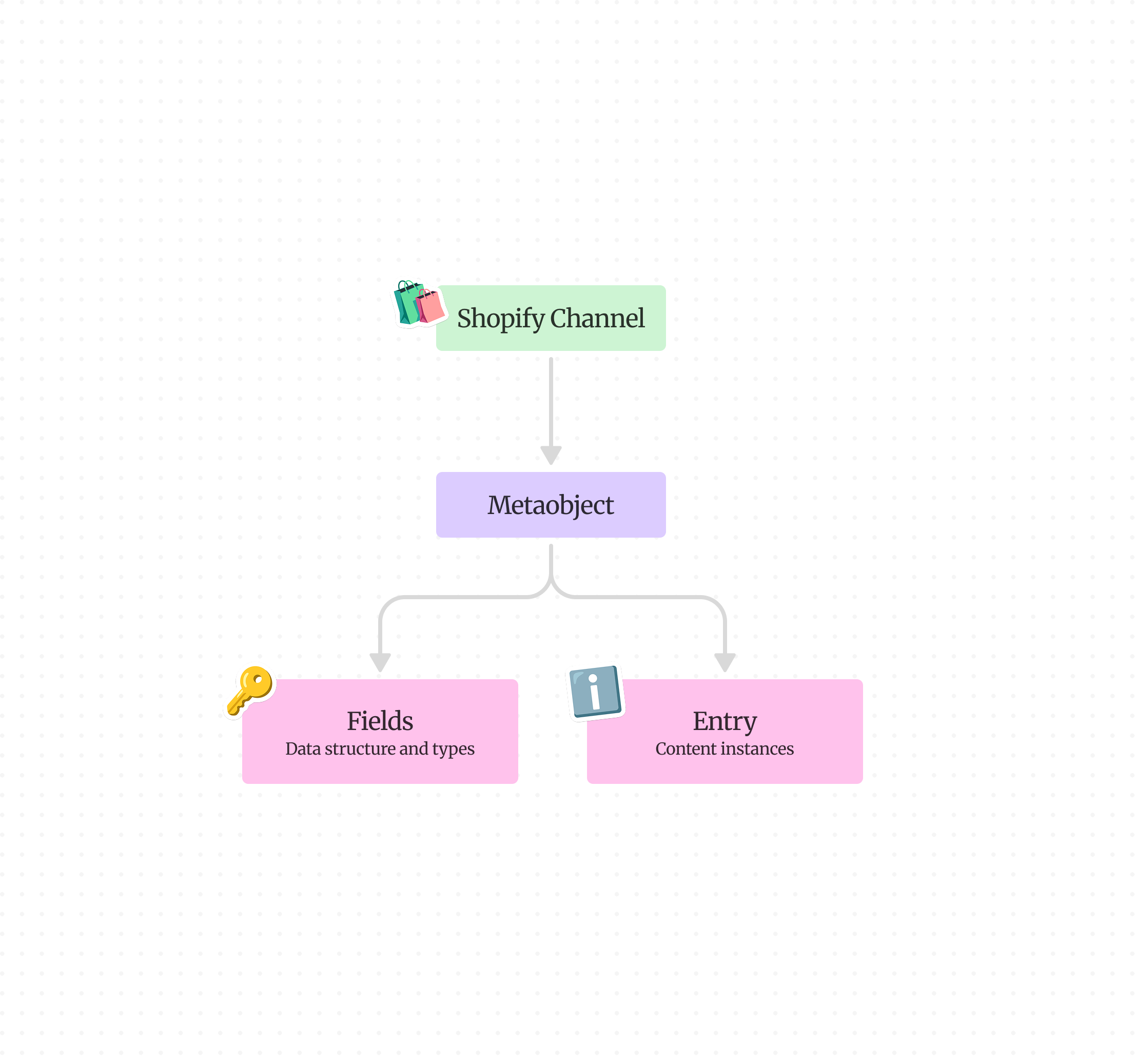
Shopify metaobjects introduce a set of related entities:
- A metaobject defines a reusable content type (for example, “Seasonal Offers”)
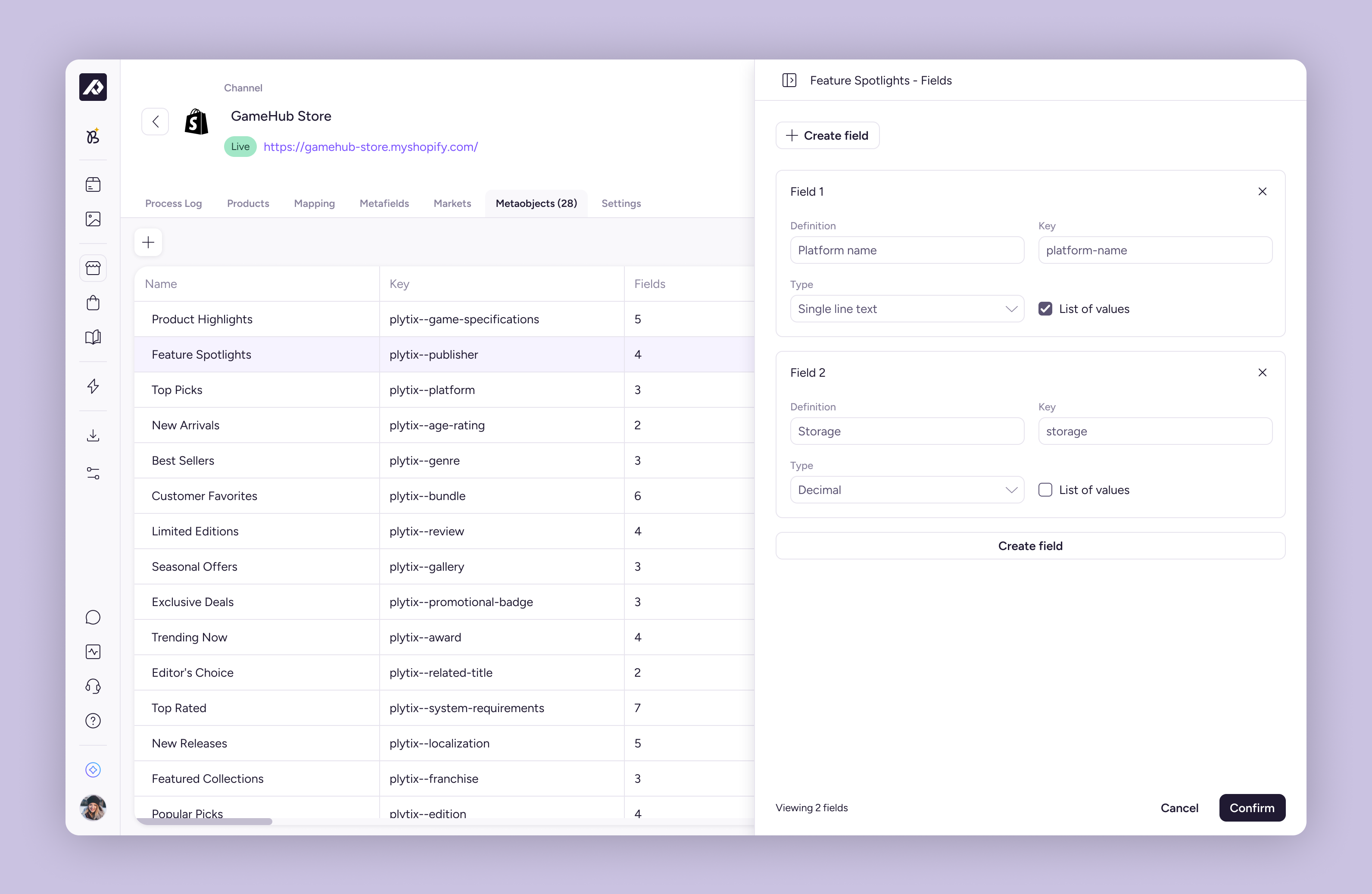
- Fields define its structure, what data it can hold (for example, discount and description), each with a type
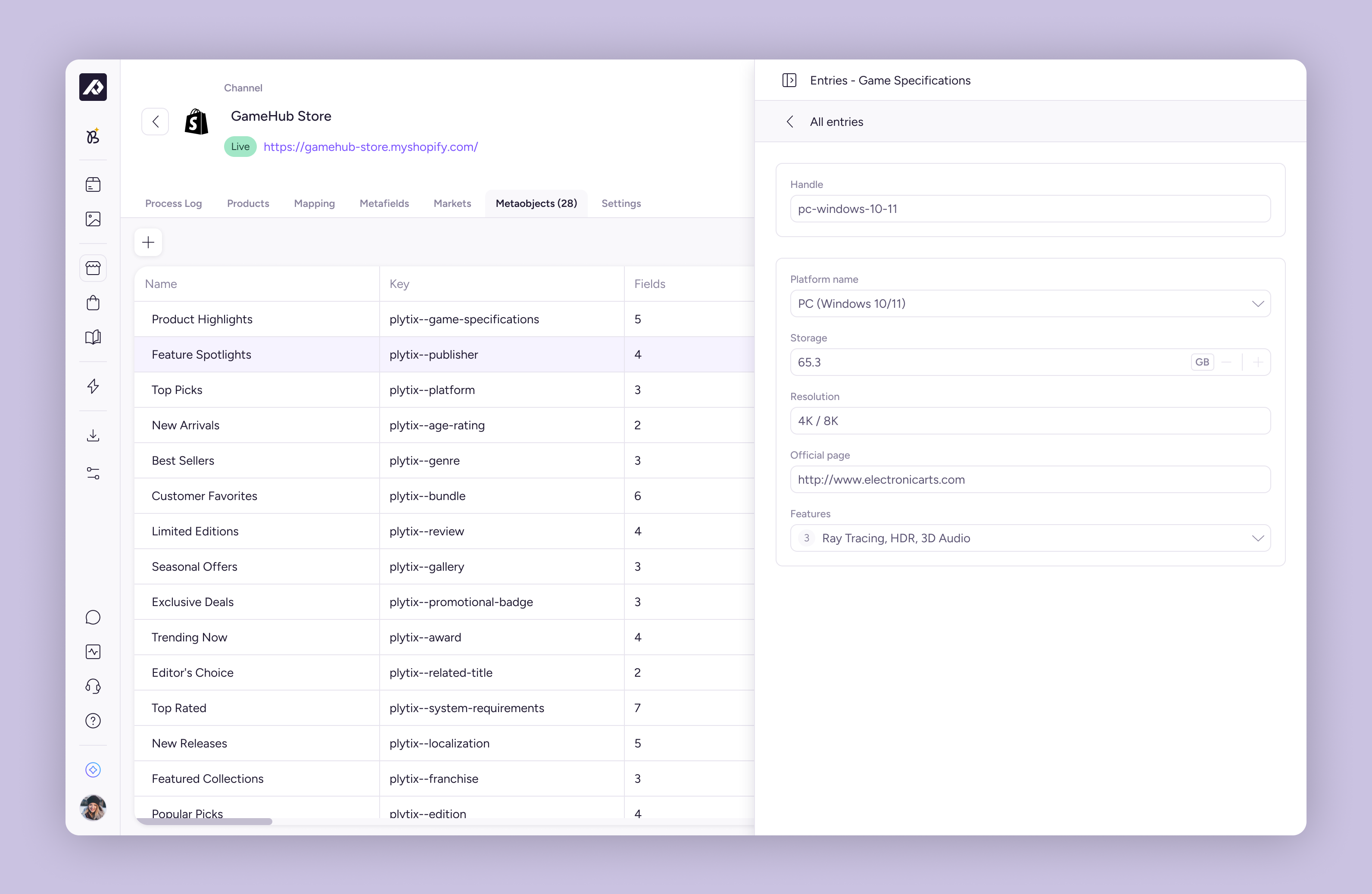
- Entries are content instances: when creating one, the user fills in values for all fields at once in a single record
- Those entities also connect to existing PIM concepts such as products and channel output
Translating that model into Plytix meant understanding how every piece related to the others and what purpose metaobjects served in a merchant’s day-to-day work.
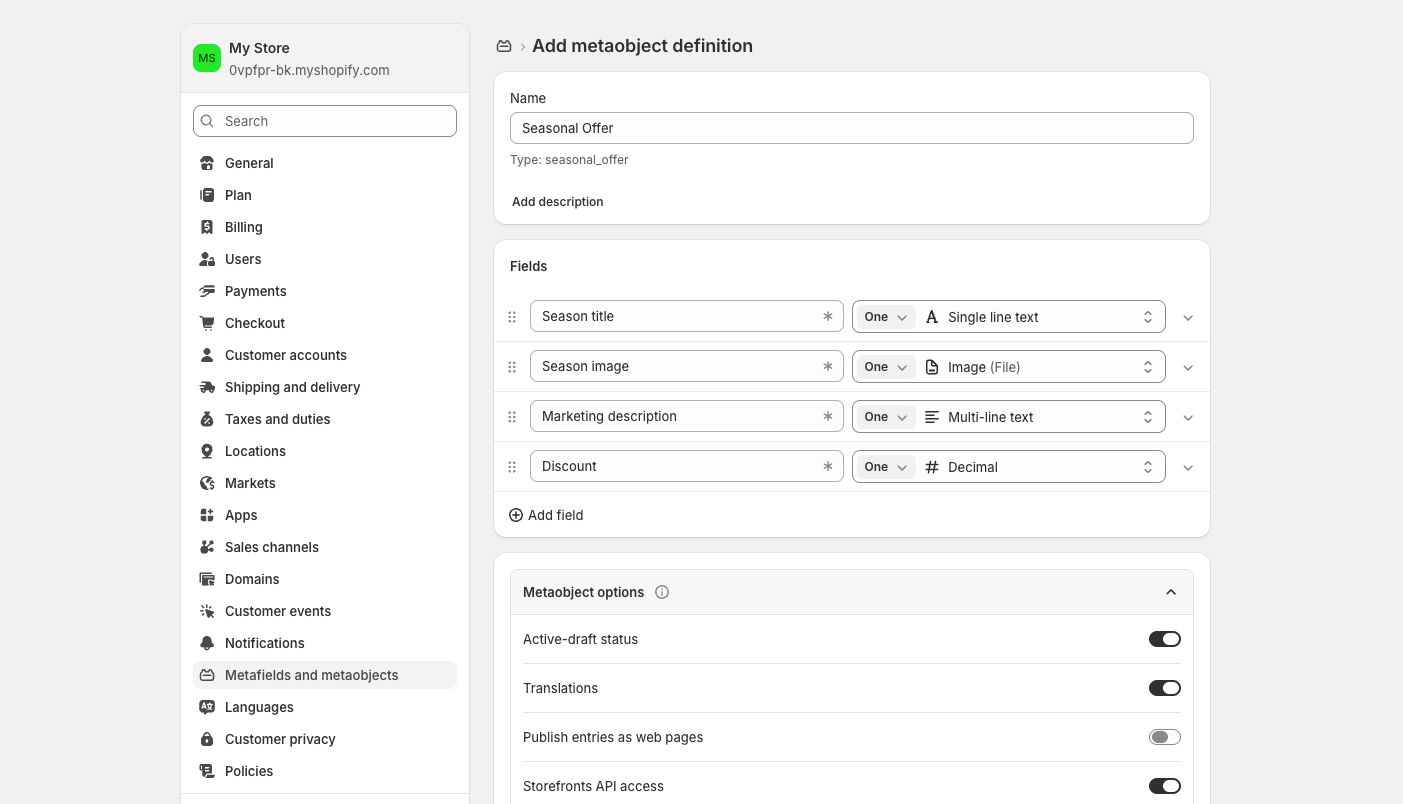
That exploration also surfaced something important: in Shopify, metaobjects are one of the main ways to manage structured content. Plytix had nothing equivalent. Product editing lived outside channels, while this feature managed content from a channel against the PIM’s usual workflow.
3. Opportunity Solution Tree
Outcome
20% of Shopify accounts create or edit at least one metaobject / entry in Plytix within 30 days.Opportunities
On import, Metaobjects structured product data was lost or flattened.
- Known
- We know the types of Shopify
- Unknown
- What is going to happen with these typed fields once the import is finished?
- Risk
- Fix only import, not editing or sync
- Confidence
- −1
- Unknown
- What can do users when they see a flag? (Fix, ignore, cancel import)
- What would be the best format?
- Risk
- Too many flags without a solution
- It erodes trust on the import. Is my product data reliable and accurate?
- Confidence
- −4
Can't reuse Shopify metaobject data while editing products in the PIM
- Known
- This is a Shopify integration and the team knows how to do this
- Risk
- It contradicts the mental model and the content edition flow.
- Confidence
- 0
- Unknown
- How do we keep entries up to date?
- Will it be enough for users?
- Confidence
- −2
Maintaining the same content in two data models (Plytix and Shopify)
- Known
- Better long term solution
- Risk
- Requires a bigger team scope/timeline
- Confidence
- 0
Key measurement points used to assess the progress and effectiveness of this integration.
- Number of mapped fields per import
- Feedback of users
- Users activating or syncing Metaobjects with Shopify channels
- % of Shopify users editing products with entries
- User testing
- Number of attributes created
4. Test scope with stakeholders
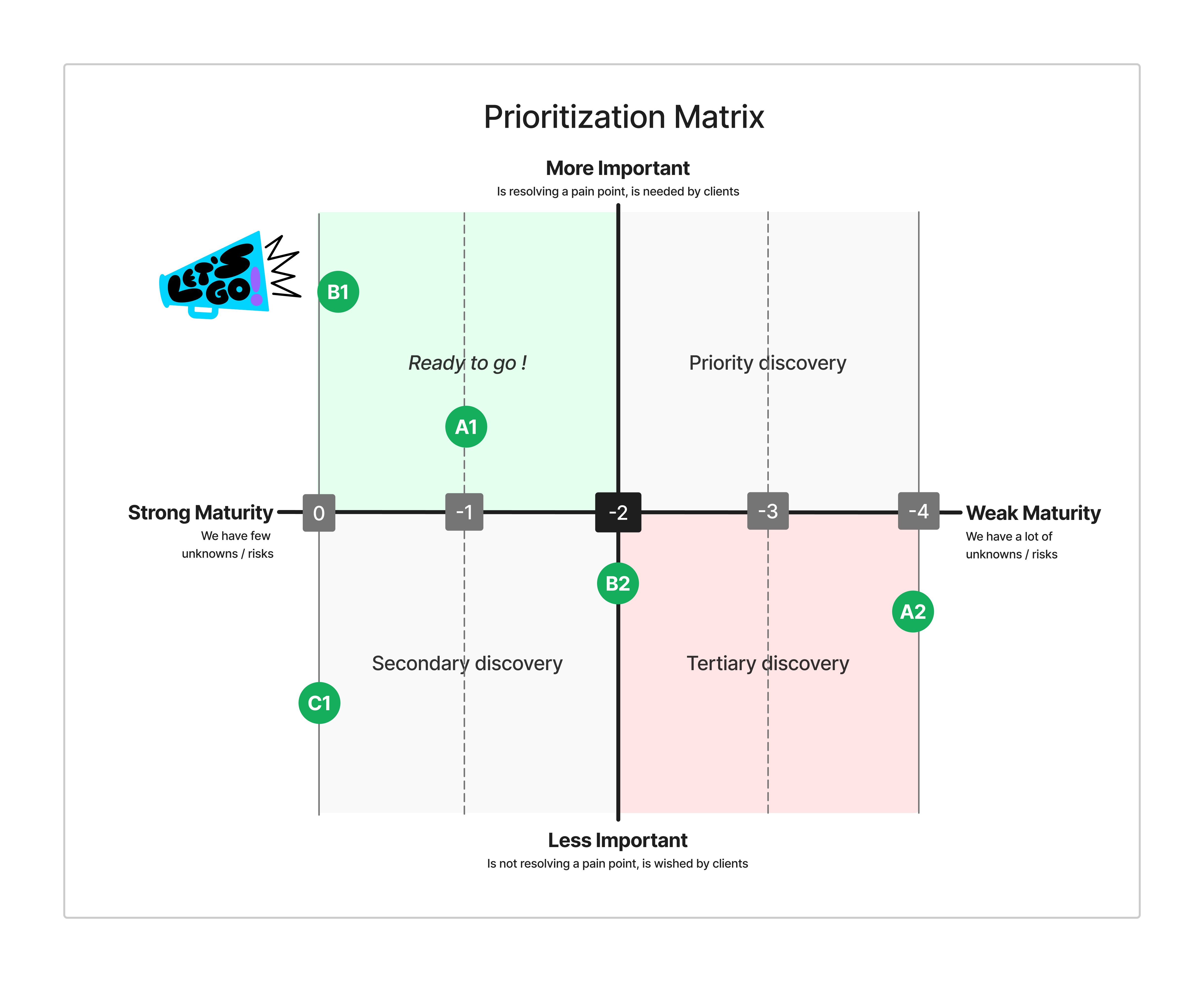
I walked the PM and engineering through the results from the OST and the prioritization matrix. The question was not which idea was the most elegant, but which solution we could own in a one-month MVP and still move the 20% outcome.
Two options kept coming back:
-
C1 — Platform attribute type compatible with Metaobjects content structure
- Stronger long-term fit: structured content would live in the PIM, not only on a Shopify channel
- Blocked for this iteration: it needed a bigger team scope and timeline, outside what this squad could ship
-
B1 — Integrate metaobjects content structure into the Shopify channel (chosen for the MVP)
- The team already knew how to extend the Shopify integration
- It answered the request in-channel, with a model merchants already recognized
- The known risk: content would sit in the channel, against Plytix’s usual editing mental model
We treated that risk as accepted, not ignored. A1 (typed fields on import) stayed in scope as supporting work so imported metaobject data would not flatten on the way in. A2 stayed out: too many unknowns for a first release. B2 — picking an existing entry on the PIM product-edit screen — also stayed out; assigning entries from the channel shipped as part of B1.
B1 was the MVP call. Ship metaobjects inside the Shopify channel now, keep C1 documented for a later platform initiative.
5. Wireframes & technical constraints
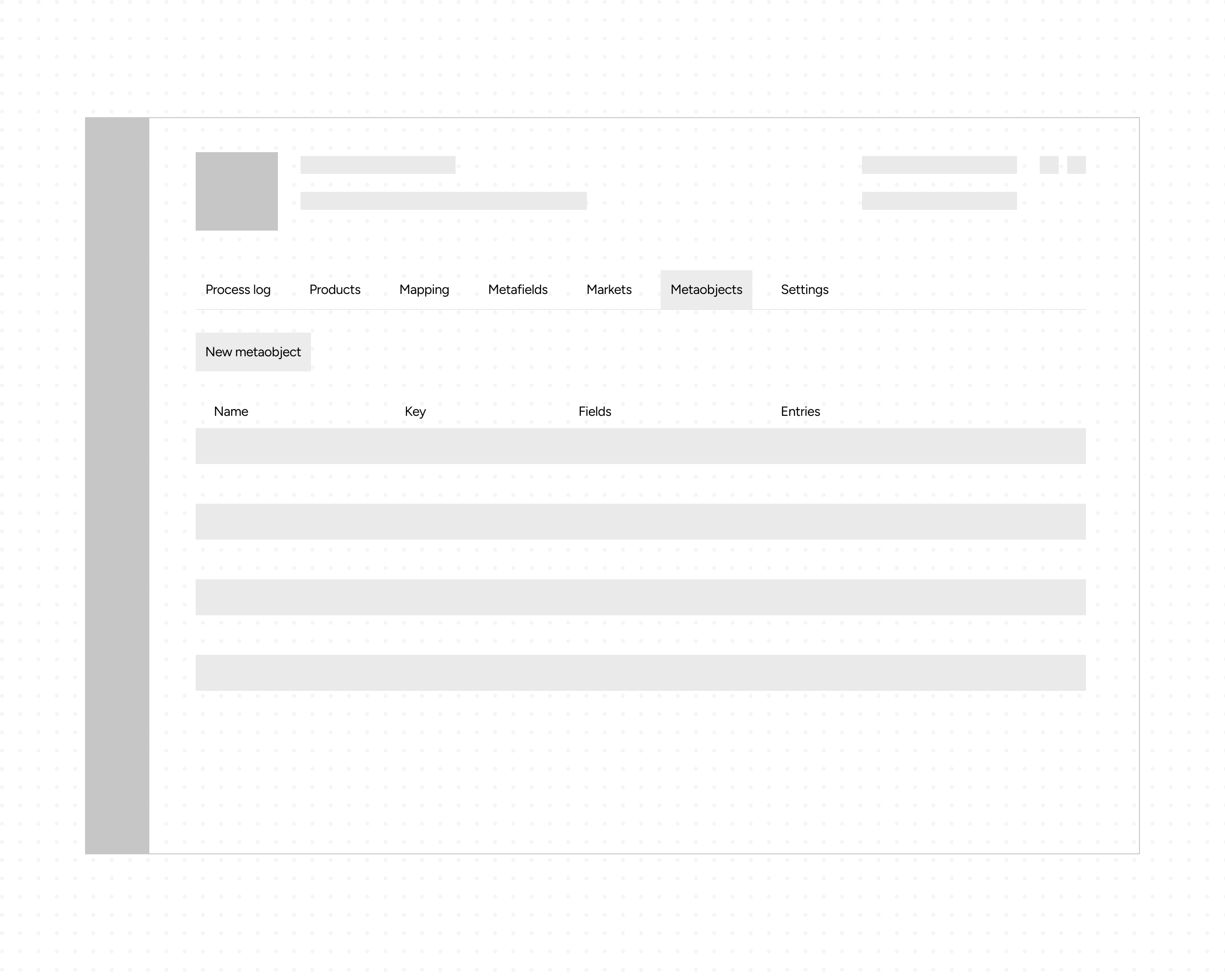
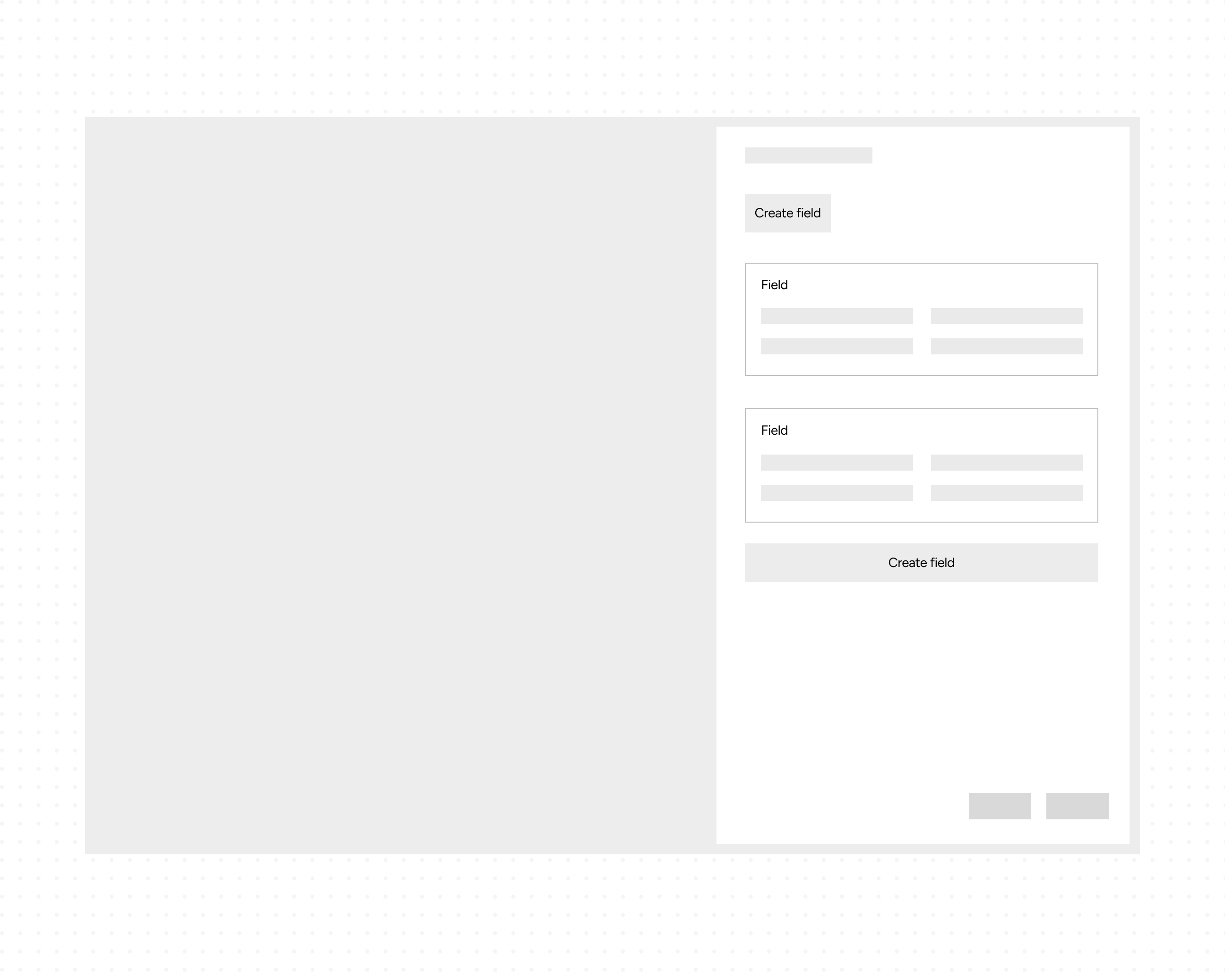
We sketched basic flows and wireframes to explore how metaobject content could live inside the current channel layout.
We then reviewed those explorations with engineering to surface technical limits early (sync keys, field types, processing behavior) so the final design stayed buildable.
The Solution
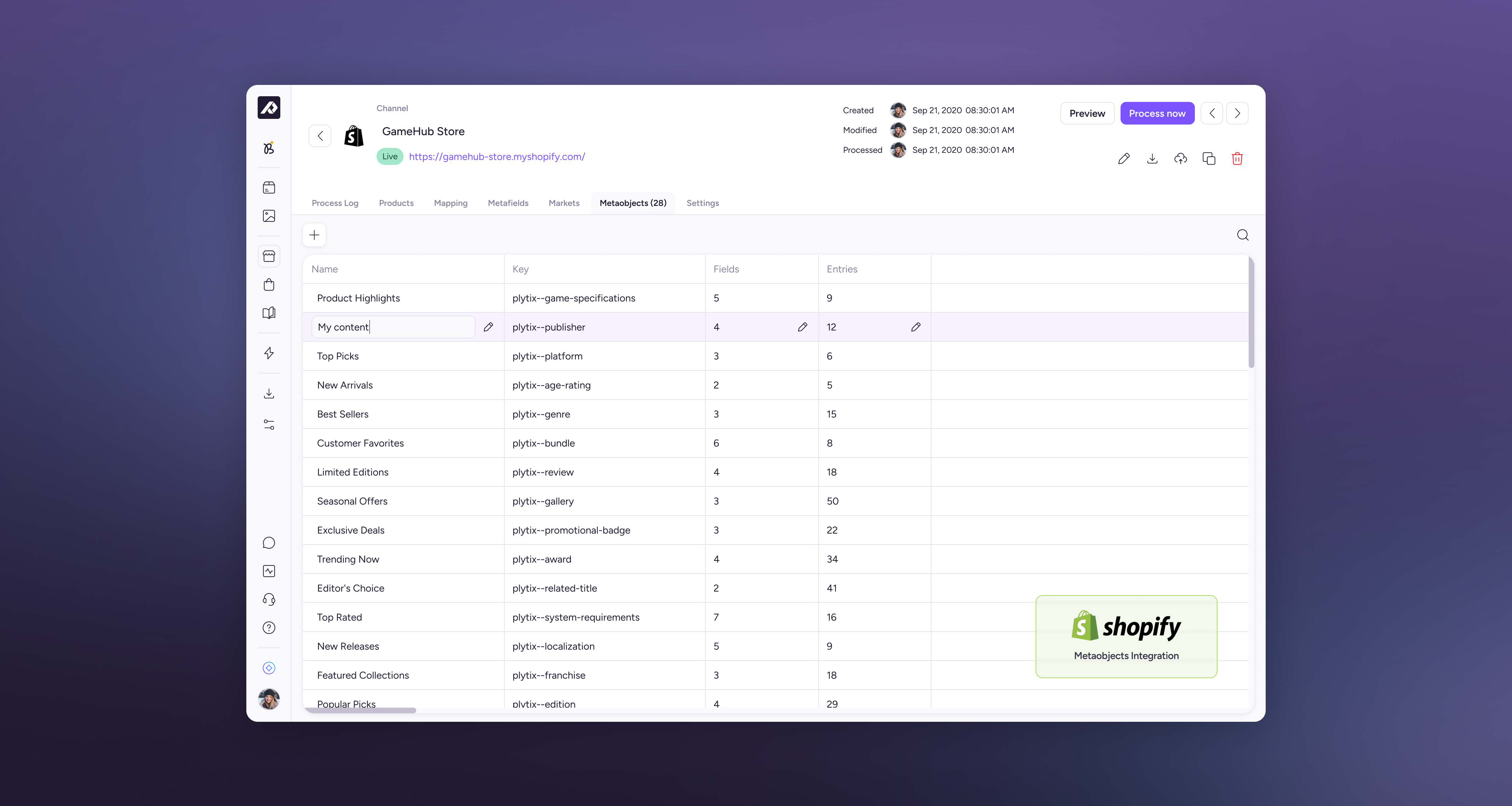
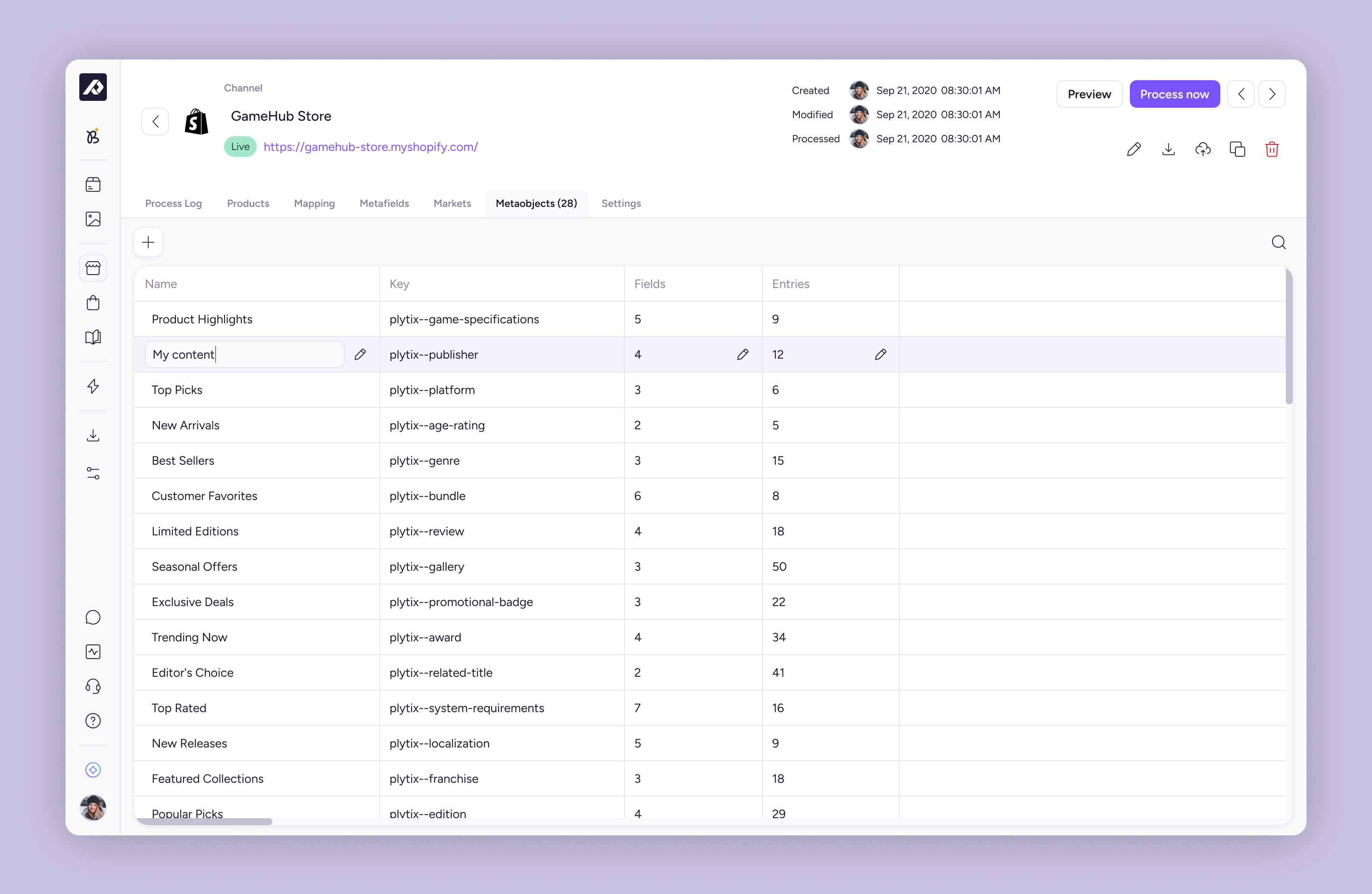
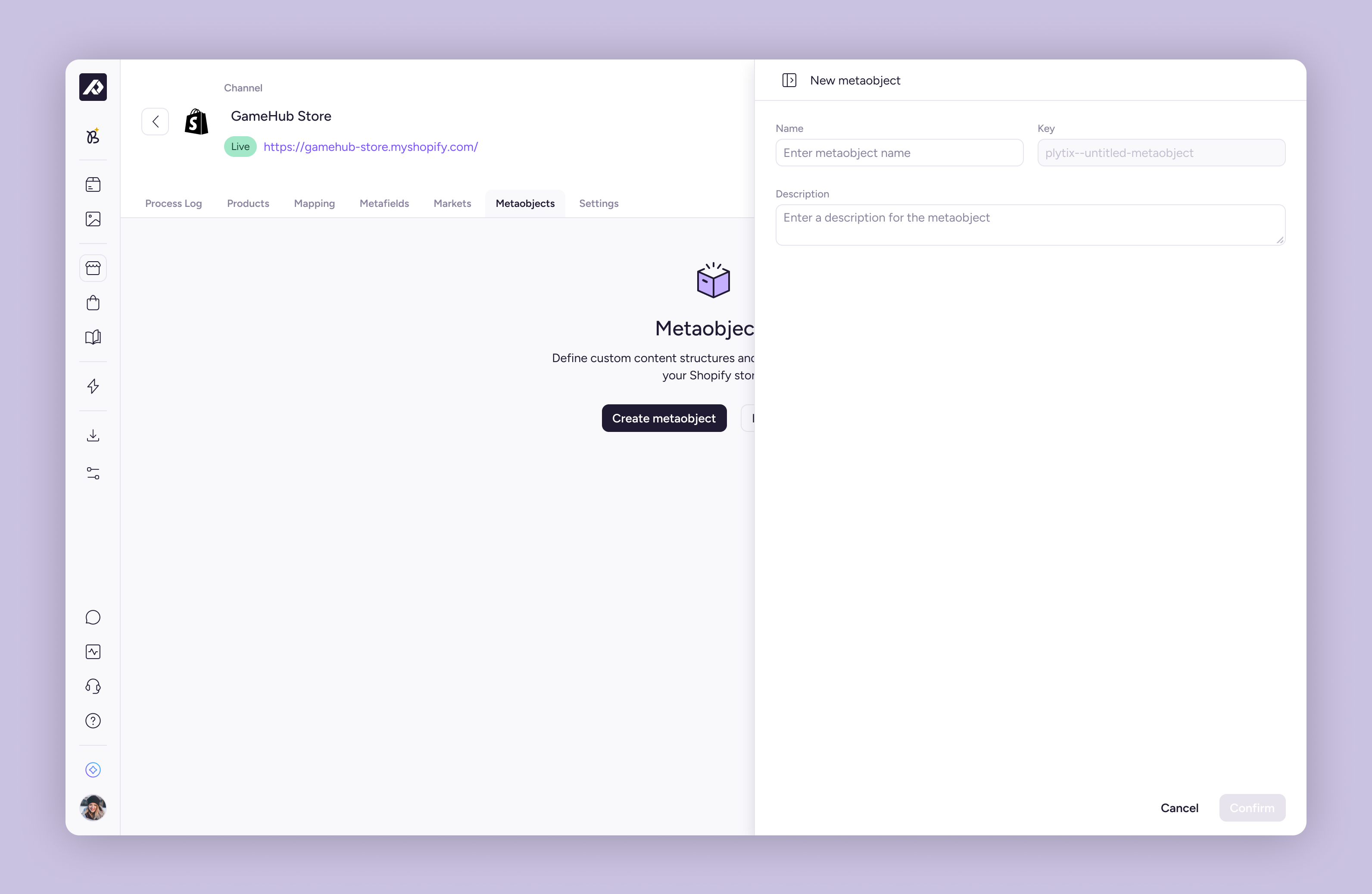
Users manage metaobjects from a dedicated Metaobjects tab on a Shopify channel. From there they can create metaobjects, define their fields, work with entries, and sync everything as part of channel processing without leaving the channel context.
What users can do
- Browse all metaobjects for a channel in one table (name, key, fields, entries).
- Create a new metaobject and assign a sync key.
- Open a side panel to define fields (label, key, type, list of values).
- Create entries and fill in all field values in one record.
- Select an existing entry per product from the channel.
- Keep working within the existing channel tabs and actions (preview, process, settings).
The model stays familiar for Shopify users: a metaobject holds fields (structure) and entries (instances), while the interaction patterns (tabs, tables, side panels) match how people already configure channels in Plytix.
Impact & Results
The MVP landed the slice we had committed to: B1, metaobjects inside the Shopify channel. For the first time, merchants could create a metaobject, define fields, add entries, and assign them to products without leaving Plytix. A first group of Shopify users started doing exactly that from the channel tab.
That was the job of this iteration. The OST outcome — 20% of Shopify accounts creating or editing at least one metaobject or entry in Plytix within 30 days — stayed the north star, not a pass/fail stamp on week four.
The technical limits we had already logged (field-type mapping, sync keys, processing) meant import still could not bring a full Shopify definition across. Many teams rebuilt the structure once in the PIM and then worked from there.
Adoption therefore built more slowly than the 30-day stretch, but it built on a model the team could extend — and C1 remained the documented path for when structured content should live in the platform, not only on the channel.
Learnings
- Familiar models travel well. Studying and adapting Shopify’s structure to Plytix patterns made me more familiar with Shopify content structure and its possibilities.
- Information architecture first. Mapping entities and relationships early made the UI work faster and kept conversations with engineering grounded.
- Opportunity Solution Tree. I improved my OST workflow by adding data-gathering steps, including a confidence score.